Here I will explain how to create Readmore on bloggers, as we know, if there is no read more, then your blog will be a long and sloppy, I create one by editing the html in your template, and add a script on posts you've written. way quite easily. first go to 'draft' and select 'edit html'
after that you download the template first before adding the script, by selecting 'Download full Template', then select the location where you want to backing up template.
The next check list "Expand Widget Templates", like the one in the picture below:
then input this script above <head>
<style>
<b:if cond='data:blog.pageType == "item"'>
span.fullpost {display:inline;}
<b:else/>
span.fullpost {display:none;}
</b:if>
</style>
and search
<p><data:post.body/></p> or <data:post.body/>
with Ctrl + F on your browser.
then, add the script just below that :
<b:if cond='data:blog.pageType != "item"'>
<a expr:href='data:post.url'> Read More..</a>
</b:if>
"Readmore" word can be replaced in accordance with your wishes, can be replaced with a "Continue Reading" or up to you.
The first step is completed. next to the tab "Settings", select "Format". then the entry box template, fill in the script as follows:
<span class="fullpost">
</span>
Then click on "Save Settings", With This setting, if you want create new post, the text above will appear automaticlly.
Now Try edit your post, and add the script below :
<span class="fullpost">
where you'll cut your post, and became Readmore. and at the end of the post, you add this script:
</span>
maybe this way is a bit complex, but with this blog we'll be able to become more orderly. one another. if you want to change the template again, then you must edit the html on the template just by means of the above. okay?
good luck ^ ^
Tuesday, June 22, 2010

Monday, June 21, 2010
Create category in blogger
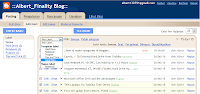
How to create categories on our blog is very easy, first login to your blog in blogger, then go to "POST" and "EDIT entry", posting a post that you have been here, to create a category, posting a checklist that you want to make as category, then select "Label Actions," and select "New Label"
Give the name of the label you want to make, then select OK.
Take a look as shown below:
Next step is to add a gadget "label" on your blog. go to "DESIGN", and Select "Page Element", here you can set your blog, right places and you can also add gadgets to your liking,
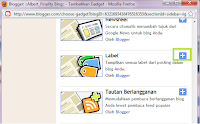
Select 'Add Gadget', then the new tab will appear, select the Label and Select the "+" to add the gadget to your blog, it looks like this:
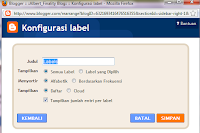
give the name of the label, it's up to you. then adjust the settings according to what you want. and Select Ok to create a Category,
Then Look at your blog now, there will be categories in your blog. If the picture is less great, just click to see more clearly.
good luck:)
Give the name of the label you want to make, then select OK.
Take a look as shown below:

Next step is to add a gadget "label" on your blog. go to "DESIGN", and Select "Page Element", here you can set your blog, right places and you can also add gadgets to your liking,
Select 'Add Gadget', then the new tab will appear, select the Label and Select the "+" to add the gadget to your blog, it looks like this:


give the name of the label, it's up to you. then adjust the settings according to what you want. and Select Ok to create a Category,
Then Look at your blog now, there will be categories in your blog. If the picture is less great, just click to see more clearly.
good luck:)
Sunday, June 20, 2010
Canvio, 1 TB External Hard Drive from Toshiba

After the presence of an external hard drive 640GB My Passport Studies from Western Digital which is regarded as the largest capacity hard drive, now the position is shifted by Toshiba. Toshiba makes portable hard drive with capacity 1TB Canvio, and measures 3.1 inches wide, 4.7 inches long and 0.65 inch thick, weighs just 3.6 oz.
Canvio Toshiba portable hard drive has a USB 2.0 port that works for power and data connections.
However, unfortunately this has not suppoer hard drive USB 3.0 port, offering greater speeds than USB 2.0. If the My Book from Western Digital Passport is aimed at Mac users, then this Canvio intended for PC users. Toshiba is also adding new devices to help PC users to backup data with ease, because the hardware is equipped also softwareNTI BackupNow EZ, and search capability also restore the data if there are files missing.
For PC users who have advanced, the software also features a choice Canvio backup, and overwrite the original file. Canvio provides a complete backup system, allow a user to restore the computer system when the system can not start. Toshiba external hard drive this Canvio given three-year warranty and comes in five colors, namely Raven Black, Satin Silver, Liquid Blue, Rocket Red, and Green dragons. For this 1TB version Canvio sold with price range of $ 200.
Asus Netbook PC 1015PE, Can Hold Up to 13.5 Hours

Asus has added a new mode for the Eee PC family. Two new model called Eee PC and 1015PE 1015P. Both models into the platform supports the Pine Trail and battery life up to 13.5 hours. Asus has included the operating system Windows 7 Starter Edition in both the laptop and one reason for long battery life is the presence of 6-cell 63Wh battery pack.
While the Intel Atom chip Pine View to integrate graphics and memory control in one place in the second netbook. Design temperature rating of the chip power is 5.5 Watts and able to maintain a longer battery life for several hours. Asus Eee PC mini laptop 1015PE 1015P and also support Wi-Fi 802.11n, Bluetooth 2.1, VGA connector, three USB 2.0 ports, LAN port, 0.3 megapixel webcam, multi-media card reader, Stereo Speakers with Hi-Definition Audio CODEC and also Mic.
Asus Netbook PC 1015PE 1015P and was entered into the model and support Seashell display 10.1-inch WSVGA LED Backlight, and a screen resolution of 1024x600 pixels. Asus equip both models with a 1.66GHz Intel microprocessor Pine View-M N450 and storage on the web as much as 500GB Asus. For battery life up to 13.5 hours, asus add 6 cell Li-Ion battery with certain settings. The difference between the two models and 1015PE 1015P PC netbook is on the color and design. However, there has been no detailed official price of the Asus.
Seagate Momentus XT, World's Fastest Hard Drive Hybrid

Seagate has announced a 5.2-inch Momentus drives XT claimed the fastest in the world. Notebook Asus Republic of Gamers (ROG) G73Jh The new Momentus hard drive is packaged with this XT. Seagate Momentus hybrid hard drive is used for laptop XT and promising performance like Solid State Drive, also features both between SSD and HDD. This hybrid hard drives will run 80 percent faster than the speed 7200RPM hard drive.
Seagate Momentus XT has a SLC-based SSD and has 32MB of DDR 3 memory cache. This HDD has a platter for maximum storage (250GB, 320GB or 500GB), together with a small SLC-based SSD for faster access speeds. Adaptive Technology Memory can use the information in flash memory for fast access.
Because it has a 4 GB SSD SLC NAND in it, Momentus hard drives can boot OS XT 100 times faster than 5400 RPM hard drive. The disk drive has a rotation speed of 7200 rpm and offers a 3 Gb / s with Native Command Queuing. This hybrid hard drive will be used in notebook Asus ROG G73Jh who has a mobile processor Intel Core i7-720QM to 8GB of DDR3 RAM and ATI Mobility Radeon HD 5870 in it.
Subscribe to:
Posts (Atom)