Sunday, November 14, 2010

Change Administrator Password By CMD
Sometimes when we install windows xp,we forgot the administrator password. Or, when in the net or in the Lab school if you want to break the administrator password can be done by passing the CMD (Command Prompt). here is how to change password :
1. Press Windows + R or START-> RUN
2. Type 'cmd' and hit enter
3. Type net (space) user (space) administrator (space) yourpassword and enter the password will be changed according to what you want. For example: net user administrator abcd, then hit enter. then the administrator password will be immediately replaced into abcd.
4. Or you can type net(space)user(space)administrator(space)*, and press enter. then will appear word "Type the password for the user : " Type your password here. Then press enter, retype again and enter. your password will change.
so easy to change the administrator password without having to know the real password. good luck ......^_^
1. Press Windows + R or START-> RUN
2. Type 'cmd' and hit enter
3. Type net (space) user (space) administrator (space) yourpassword and enter the password will be changed according to what you want. For example: net user administrator abcd, then hit enter. then the administrator password will be immediately replaced into abcd.
4. Or you can type net(space)user(space)administrator(space)*, and press enter. then will appear word "Type the password for the user : " Type your password here. Then press enter, retype again and enter. your password will change.
so easy to change the administrator password without having to know the real password. good luck ......^_^
How We Know What Type of Our Motherboard..
When we buy new computer or second computer but we lost the CD driver, of course we will be having trouble finding drivers for our motherboard. Some motherboards do have device drivers that "plug n play", meaning that when completed the install, all direct drivers to function properly. But if not? Of course we will be confused to find our motherboard drivers if its any kind of motherboard you do not know.
Here, some tips to determine what type of motherboard or determine the type of device driver to us:
1. Turn on your computer, so the computer reads "BEP" quickly press a button Pause - Break on the keyboard. Display monitor will be as below.
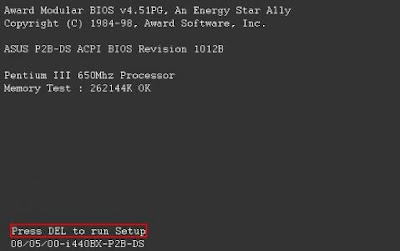
Look in the lower left corner, below the words "Press DEL to run Setup". It type of our motherboard. We find these types P2B motherboard we are using the chipset i440BX. Write on paper, or memorized. Searching on Google to find the driver.
Another way to know type of our motherboard is open dxdiag on the windows.
START->RUN->Type "dxdiag" or Windows + R and type dxdiag
then will be appear specification of your computer like a RAM,Processor,Sound,Video,Motherboard,operating system, and your input devices. look a picture below :
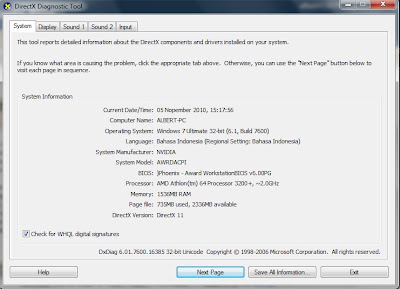
look at System Manufacturer : NVIDIA and System Model : AWRDACPI
its mean your motherboard type is NVIDIA AWRDACPI. you can search your driver motherboard with google with keyword "NVIDIA AWRDACPI"
Here, some tips to determine what type of motherboard or determine the type of device driver to us:
1. Turn on your computer, so the computer reads "BEP" quickly press a button Pause - Break on the keyboard. Display monitor will be as below.

Look in the lower left corner, below the words "Press DEL to run Setup". It type of our motherboard. We find these types P2B motherboard we are using the chipset i440BX. Write on paper, or memorized. Searching on Google to find the driver.
Another way to know type of our motherboard is open dxdiag on the windows.
START->RUN->Type "dxdiag" or Windows + R and type dxdiag
then will be appear specification of your computer like a RAM,Processor,Sound,Video,Motherboard,operating system, and your input devices. look a picture below :

look at System Manufacturer : NVIDIA and System Model : AWRDACPI
its mean your motherboard type is NVIDIA AWRDACPI. you can search your driver motherboard with google with keyword "NVIDIA AWRDACPI"
Wednesday, September 15, 2010
Download Video From Youtube
Many people watching video in youtube. How we can download it video? I will Explain How to Download video in youtube using IDM(Internet Download Manager). It's easy..
First, make sure the browser you use is Mozilla Firefox. if you don't have mozilla , you can download here
Install Mozilla Firefox on your computer.
Second, You can Download Internet Download Manager here
After that, install IDM(Internet Download Manager) on your computer. and restart Firefox so the Internet Download Manager can appears on Firefox like in the picture below..
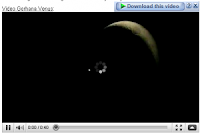
Easy right? after you stream the video, click download link, and Internet download manager will download automaticly... This post hopefully can help :)
First, make sure the browser you use is Mozilla Firefox. if you don't have mozilla , you can download here
Install Mozilla Firefox on your computer.
Second, You can Download Internet Download Manager here
After that, install IDM(Internet Download Manager) on your computer. and restart Firefox so the Internet Download Manager can appears on Firefox like in the picture below..

Easy right? after you stream the video, click download link, and Internet download manager will download automaticly... This post hopefully can help :)
Subscribe to:
Posts (Atom)